This document describes the new features affected in the mycloud release sprint 1.0.1.4.5A.
This document is divided into the following sections:
1. About the Release
2. New Features
3. Improvements
4. Additional Resources
About the Release
Release Date: 12th May 2026
This release contains the following new features and improvements.
👍 New Features

PMS → System Enhancements → Manager Functions
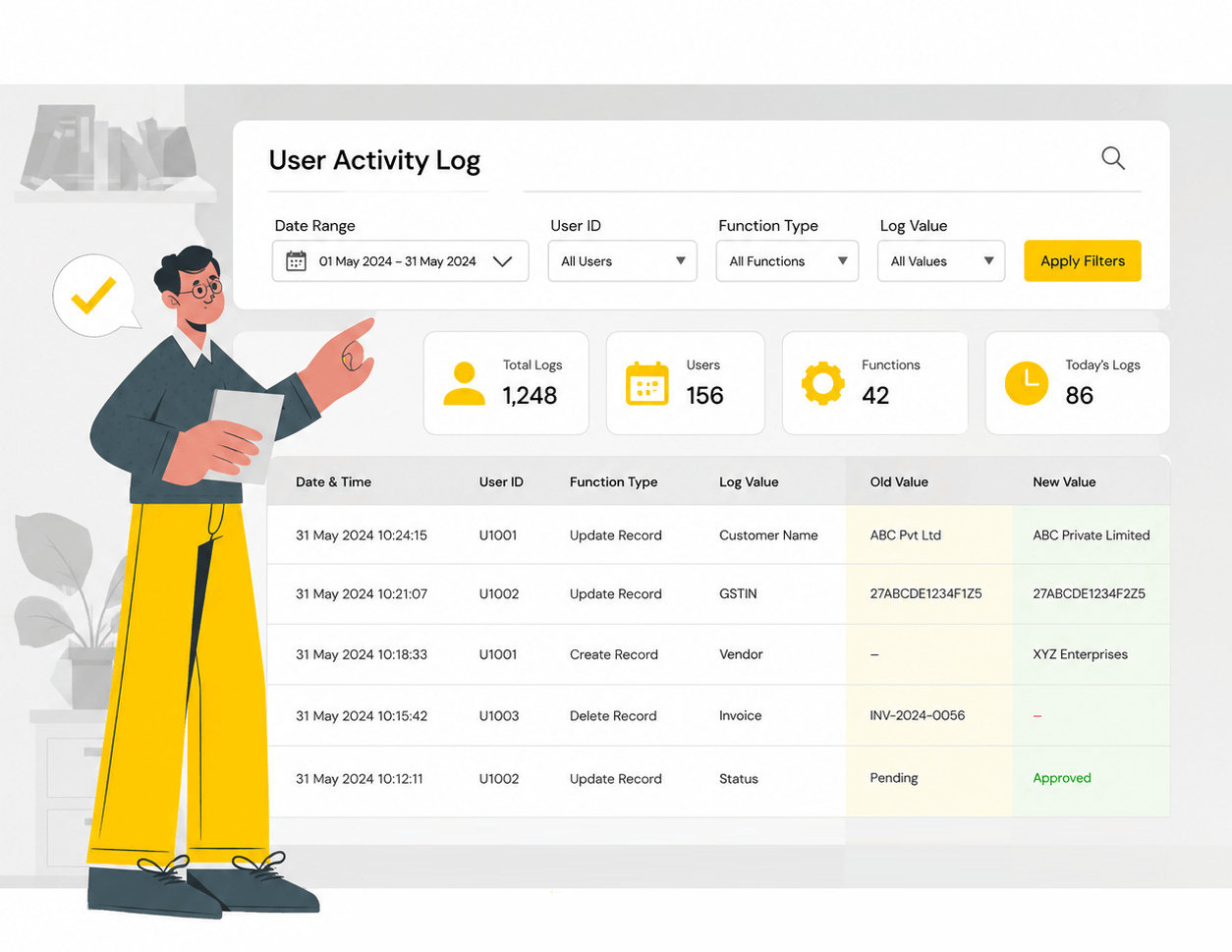
A new screen, the user activity log a comprehensive tool that gives managers full visibility into every action taken within the system. It acts as a digital audit trail, ensuring that all modifications are recorded and easily searchable.
If you need to share your findings or keep an offline record, you can download your search results instantly either a PDF or an Excel file with a single click.
🚀 Improvements
We’ve improved several operational and financial reports to make them easier to read and more actionable:
mycloud 2.0 → login
We’ve added new layers of protection to ensure your data stays safe and only accessible to the right people reducing the risk of unauthorised sign-ins from unrecognised networks.
PMS → Reports
The Payment Reconciliation report in PMS → Reports is now more organized and easier to use. Transactions are automatically grouped by payment method, helping finance teams quickly reconcile cash, card, UPI, and other payment types without manually sorting data.
The Guest Data Bank report under PMS → Reports → Guest Data Bank now includes guest notes, special comments, and billing instructions in a single view. Front-desk and billing teams can access important guest-related information instantly, reducing the need to switch between multiple screens.
The GST/Non-GST Invoice report has been enhanced to display all tax lines linked to an invoice — not just the primary GST components. This gives finance and audit teams a more transparent and detailed tax breakdown, making compliance verification and financial auditing much easier.
PMS → Cashiering
A new advanced setting called SVCSLB (Calculate Slab Rate including Service Charge) has been added under PMS → Cashiering → Tax Configuration.
When this option is enabled, the system automatically combines the room charge and service charge before calculating the GST slab. This is especially useful for hotels using tiered GST structures, ensuring more accurate tax calculations and reducing the risk of billing discrepancies.
New Detailed GST Invoice Format Available Instantly
Under PMS → Cashiering → GST Invoice, a new Invoice Type 10 is now available directly from the Print Invoice screen.
This format provides a more detailed invoice presentation while intelligently merging inclusion charges under the room charge line for cleaner and easier-to-read billing. Best of all, no additional RDL upload or configuration changes are required — hotels can start using it immediately.
PMS → Reservations
Faster Booking Creation: The Quick Reservation screen now allows direct Rate Plan selection and rate copying across dates, making reservations and CRS bookings quicker and easier.
Improved Late Check-Out Billing: The cashiering check-out flow now correctly shows the posting window for late check-outs, helping prevent missed charges.
Smarter Folio Instructions: Folio instructions can now apply to all or selected departments/revenue heads, automating charge postings and simplifying complex billing setups.
mycloud PMS → Interfaces
Smarter TravelClick Sync: Booking updates now sync with TravelClick only when rates or revenue change, reducing unnecessary sync activity and conflicts.
Enhanced Tally Integration: Tally postings are now more accurate and transaction-based, with improved handling of receipts, settlements, advance deposits, and split POS payments for easier reconciliation and cleaner accounting.
PMS → System Enhancements
The Channel Manager log viewer has been updated to display Rate Tiger integration logs, giving revenue managers full visibility into channel activity from a single screen.
PMS / SYS → Multilingual
The search screen now renders Arabic content correctly, with proper right-to-left alignment. Language display is now tied to each individual user’s preference rather than a system-wide setting.
Additional Resources
To watch recorded training videos of Property Management System & Point of Sales, check out mycloud YouTube channel – https://www.youtube.com/c/mycloudpms/playlists